Block a Number: Stop Spam and Unwanted Messages
You can now block a number from the inbox. A blocked number can no longer reach your inbox, your chatbots or your team, and Waplify sends nothing to it: no replies, campaigns, sequences or chatbot messages.
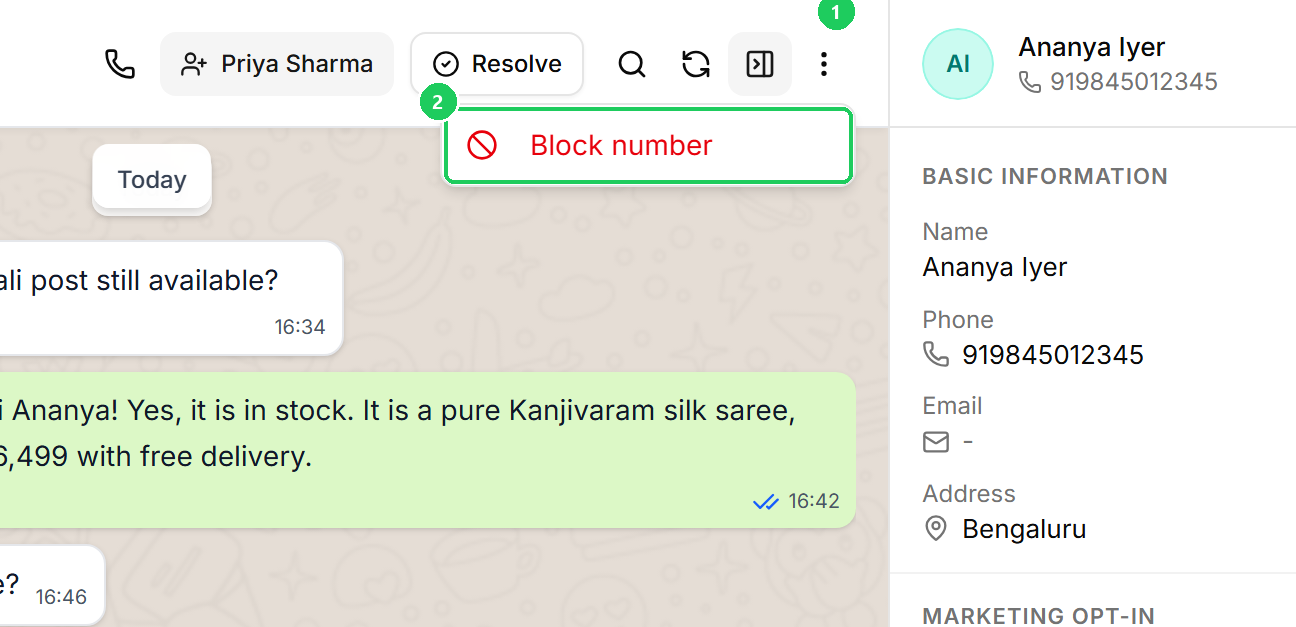
How to block someone
- In Chat, open the chat and click the ⋮ menu at the top right.
- Click Block number.
- Check the message and click Block.
The chat is resolved and marked Blocked. Any drip sequence or chatbot running for that person stops.
Good to know
- You can unblock at any time. Open the chat and click Unblock number.
- See everyone you have blocked. In Chat, open the filter next to the search box and tick Blocked numbers only.
- Who can block: Owners, admins and managers. Agents can't.
- Available on every plan.
Full details are on the Block a Number page.